Consulting
Experience
Expertise in Finance, Accounting & IT
The regulatory landscape for tax reporting and documentation requirements is undergoing profound structural change worldwide. Electronic invoicing, real-time reporting, and standardized data formats are evolving from optional procedures to mandatory compliance standards in many countries. In parallel, SAP is consolidating and modernizing its solutions for tax reporting and documentation requirements under the umbrella of SAP Document and Reporting Compliance (DRC). While DRC was initially perceived primarily as a reporting and localization solution, a strategic realignment is now evident: DRC is developing into a central compliance layer within modern SAP architectures – particularly in conjunction with SAP S/4HANA and the SAP Business Technology Platform (BTP).
The years 2025 and 2026 mark a phase of fundamental changes:
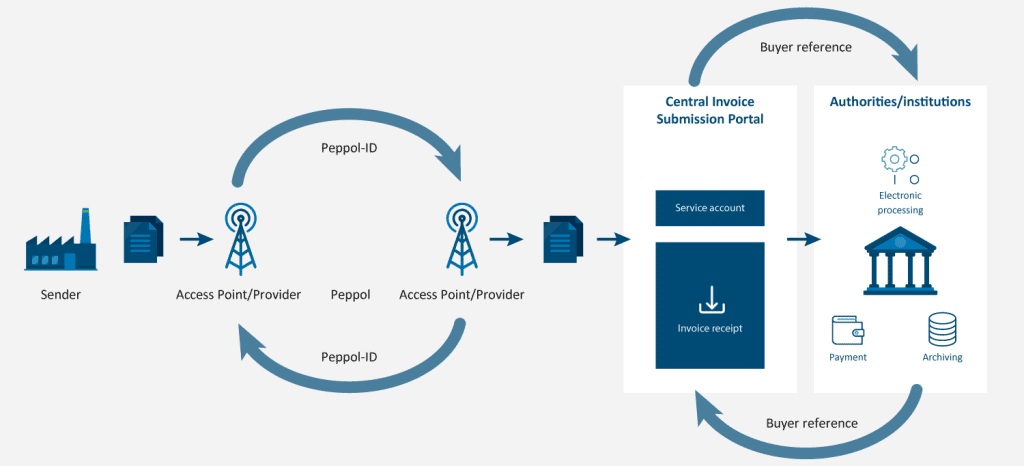
Source: Federal Ministry of the Interior (2025)
One of the most significant developments is the migration of existing compliance services to the DRC Cloud Edition. SAP aims to consolidate electronic invoicing, tax reporting, and communication with authorities on a single platform.
Key aspects of this transformation:
This transformation is not merely a technical upgrade. It represents a strategic repositioning. Compliance functions will no longer operate in isolation, but will be more strongly integrated into core transactional processes.
For companies, this means specifically:
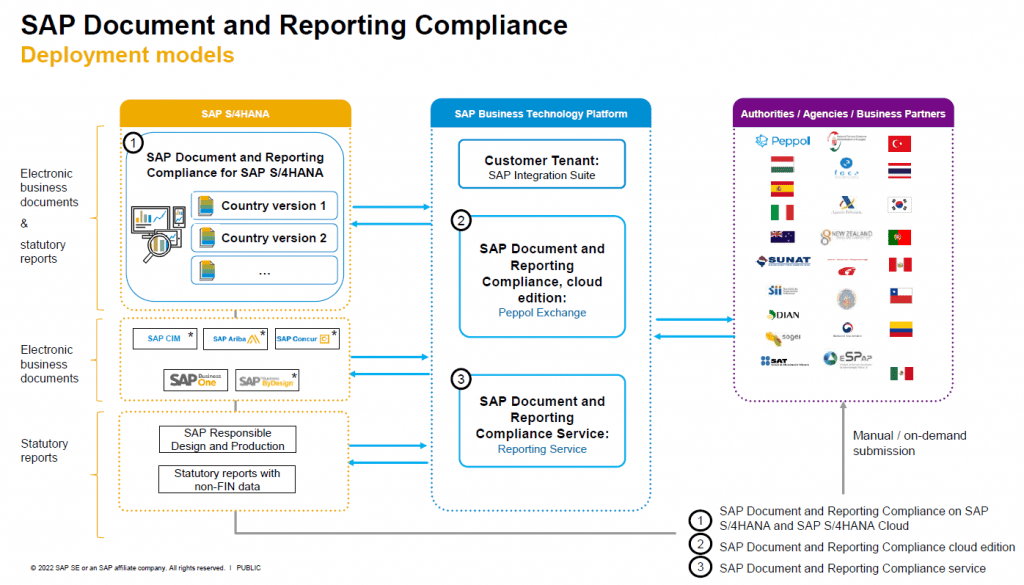
Parallel to the technological transformation, regulatory requirements in Europe are becoming significantly stricter. The introduction of mandatory electronic invoices and the planned EU reform "VAT in the Digital Age" (ViDA) are leading to a structural realignment of VAT compliance.
Germany is gradually introducing mandatory electronic invoicing in the B2B sector. Starting in 2025, there will initially be an obligation to receive electronic invoices. In subsequent years, the obligation to issue electronic invoices will be expanded until ultimately all B2B transactions must be processed electronically. This development is not an isolated national process, but rather part of a Europe-wide trend towards standardized, digital reporting procedures.
The EU initiative ViDA goes even further. It envisions transmitting transaction data to tax authorities in near real-time. This shifts the focus from periodic reporting to continuous transaction monitoring. For companies, this means:
This regulatory dynamic increases the pressure on companies to systematically modernize and centrally manage their compliance architecture.
Outside of Germany, numerous countries are also pushing forward with mandatory electronic invoicing and reporting systems. In many cases, these are so-called Continuous Transaction Controls (CTC), where transactions must be validated or pre-approved in near real time. The individual countries are pursuing different regulatory approaches, ranging from centralized government clearance systems and reporting models to network-based transmission structures. The following overview presents selected European initiatives and their basic design.
| Country | System | Preface | characteristics |
| Germany | B2B e-invoicing obligation | 2025–2028 | Structured format (XRechnung, ZUGFeRD), no clearance system |
| Poland | KSeF | from 2026 | Clearance system via central government platform |
| France | E-Invoicing & E-Reporting | from 2026 | Hybrid model (PDP + government portal) |
| Belgium | Peppol | from 2026 | Network-based invoice transmission |
| Italian | SDI | already mandatory | Central validation by the tax authority |
| Spain | VeriFactu | gradually | Reporting model with near real-time transmission |
Parallel national initiatives are leading to an increasing fragmentation of regulatory requirements, while at the same time the need for technical standardization within corporate systems is growing. For internationally operating companies, this means that national compliance requirements must be increasingly integrated into global IT and process architectures. Platform solutions such as SAP Document and Reporting Compliance (DRC) They can act as a central integration layer, through which different national reporting requirements can be implemented in a standardized way.
In addition to regulatory requirements, SAP's technological roadmap significantly shapes the further development of DRC. The platform is increasingly being positioned as an integral component of cloud-based ERP architectures.
Furthermore, SAP is working on intelligent functions for data validation and error analysis. The goal is to identify compliance risks early and address deviations system-wide. This transforms DRC from a reactive reporting solution into a proactive management tool within the financial architecture.
The developments described above are leading to a fundamental reassessment of the role of compliance technology. Companies are not only facing technical migrations, but also a structural transformation of their tax and reporting processes. Particularly in the context of S/4HANA transformations, DRC is gaining strategic importance. If compliance is not integrated early on, subsequent adaptation costs and operational risks will arise. Furthermore, the increasing regulatory dynamism is driving the need for clear governance structures. Companies must define how regulatory changes are identified, assessed, and implemented within their systems. In addition, responsibility is increasingly shifting from purely operational departments to interdisciplinary teams from IT, tax, and finance. Compliance is thus becoming a strategic management issue and no longer merely an administrative obligation.
Best practices from transformation projects show that early strategic integration of DRC into the ERP roadmap significantly reduces implementation risks.
In the coming years, a further expansion of mandatory real-time reporting models is expected. National initiatives will increasingly be complemented by harmonized European initiatives. At the same time, SAP will consistently expand its cloud strategy and further standardize compliance functionalities. The role of DRC will continue to evolve from a purely localization and reporting solution to a global compliance integration layer. Companies that define a consistent target architecture early on can not only meet regulatory requirements but also use them as a lever for process standardization and increased efficiency.
Recent developments surrounding SAP Document and Reporting Compliance illustrate that companies are undergoing a phase of structural reorganization of their compliance architecture. The migration to cloud-based solutions, mandatory e-invoicing regulations, and the ViDA initiative are fundamentally changing the requirements for financial and tax processes. SAP DRC should therefore no longer be viewed as an isolated reporting tool, but rather as a strategic component of modern ERP and tax technology architectures. An early, systematic roadmap is crucial to minimizing regulatory risks while simultaneously realizing sustainable efficiency gains.
With the introduction of IFRS 16 Lease accounting has fundamentally changed. Lessees are now required to recognize almost all lease agreements on their balance sheet – with a right-of-use asset on the asset side and a corresponding lease liability on the liability side. For many companies, this means significantly greater complexity in processes, data management, and valuation.
SAP S / 4 HANA provides with SAP RE-FX (Flexible Real Estate Management) and SAP Contract and Lease Management (CLM) Two established approaches are available for implementing IFRS 16 in a compliant, integrated, and audit-proof manner. This article provides a structured overview of both options, their application scenarios, and decision criteria from a consultant's perspective.
IFRS 16 sets clear professional and technical requirements for IT systems:
SAP S/4HANA does not address these requirements via a separate module, but rather integrates IFRS 16 deeply into existing contract, asset and financial processes.
SAP RE-FX This is the classic SAP module for managing real estate and leases. It is particularly suitable for companies with a high proportion of... Real estate and land leasing, such as:
SAP RE-FX offers extensive standard functions for IFRS 16 mapping:
The activation of IFRS 16 logic is achieved via valuation rules and valuation areas, so that parallel accounting standards (e.g., German Commercial Code (HGB), IFRS) can be mapped.
SAP CLM CLM is the strategic SAP solution for the central management of all types of leasing and contractual relationships. Its modular design makes CLM particularly attractive for companies with heterogeneous leasing portfolios, e.g.:
SAP CLM was explicitly developed with IFRS 16 in mind and offers:
SAP CLM is fully S/4HANA optimized and uses modern data models and Fiori interfaces.
Decision criteria for using SAP RE-FX or SAP CLM can include the focus of the type of leasing, the company's orientation, and the SAP technology already in use.
If both real estate and fixed asset leasing exist, a combination of SAP RE-FX for real estate leasing and SAP CLM for other leasing contracts may be useful.
IFRS 16 with SAP RE-FX (Flexible Real Estate Management), if:
IFRS 16 with SAP CLM (Contract and Lease Management), if:
| Criterion | SAP RE-FX | SAP CLM |
| main emphasis | Real estate leasing | All types of leasing |
| Features | Very deep for real estate | Broader, more flexible approach |
| Customizing | High | Medium |
| SAP's future focus | Stable | Strategically prioritized |
| Recommended for | Real estate-intensive companies | Heterogeneous leasing portfolios |
Regardless of the chosen module, the following points are crucial:
SAP S/4HANA provides powerful tools to implement IFRS 16 efficiently, transparently and in an audit-proof manner. SAP RE-FX impresses with its depth in real estate leasing, while SAP CLM It scores points as a flexible, future-oriented solution for a broad leasing portfolio.
The right module strategy is less a technical decision than a strategic one. A thorough analysis of the leasing landscape and experienced SAP consulting are key to a sustainable and audit-proof IFRS 16 implementation.
With the publication of Delegated Regulation (EU) 2026/73 am 8 January 2026 In the Official Journal of the European Union, the EU makes targeted adjustments to the delegated acts of the EU taxonomy. The aim is to improve the application of the taxonomy, particularly in the context of Article 8 disclosures to make it more practical without lowering the level of regulatory protection.
The changes focus on the Introduction of a materiality principle in taxonomy reporting – a step that represents a noticeable relief for many companies.
The central element of Delegated Regulation (EU) 2026/73 is the formal introduction of a materiality principle.
(Financial) companies will in future no longer obliged, activities or exposures that are considered not financially significant to be classified, to fully check their taxonomy compliance.
The EU is thus following a practical approach that is already known from other regulatory areas (e.g. CSRD).
In addition to the materiality principle, the regulation also provides for a structural revision of the Article 8 templates .
For companies, this means a clearer reporting logic and easier integration into existing reporting and system landscapes.
Another focus of the Delegated Regulation is on the Clarification of technical evaluation criteria, particularly in connection with the “Do No Significant Harm” principle (DNSH).
Clarifications concern, among other things, the environmental objective of the
"Avoidance and reduction of environmental pollution".
These clarifications are intended to reduce room for interpretation and lead to a more uniform application contribute to the taxonomy in practice.
Even though the new regulations bring some relief, the EU taxonomy remains a demanding set of rules. The materiality principle still requires a clean derivation, documentation and governancein order to remain resilient to auditors and regulatory authorities.
INSIRE helps companies to
Do you want to know how the changes will specifically affect your taxonomy reporting? Feel free to contact us – we will support you from analysis to operational implementation.
In many companies, the month-end and year-end closing still looks surprisingly analog today: Excel sheets sent back and forth via email, multiple versions of the same file, manual to-do lists, and constant questions like “How far along are you?”
The result: high coordination effort, lack of transparency on the status of individual tasks, and an increased risk of errors – especially in international corporations with many entities.
This is exactly where SAP Advanced Financial Closing (AFC) comes in. The cloud solution was developed by SAP to standardize, automate, and make the financial closing process transparent across all units, systems, and countries.
With AFC, all closing tasks are consolidated in a central closing calendar.
Instead of decentralized Excel sheets, there is a shared, system-supported overview:
On this basis, group-wide templates can be created and rolled out to all entities. This makes the closing process not only more efficient but also more audit-proof and consistent.
Each task in the closing calendar is assigned to a responsible person – including start and end date, priority, and status. Through workflows and notifications, AFC ensures that:
This not only reduces email ping-pong but also creates clear governance in the closing process. Auditors receive traceable documentation at the push of a button showing who completed which task and when.
A key added value of SAP AFC lies in real-time monitoring of the closing process. Instead of collecting status reports manually, finance and closing teams receive:
This allows bottlenecks to be identified early and addressed proactively – a crucial factor when the closing process becomes time-critical.
AFC is designed as a cloud extension (Software as a Service) for SAP S/4HANA. Typical benefits in combination with S/4HANA include:
This allows AFC to integrate seamlessly into a modern finance transformation roadmap and supports companies on the path to a digitized, accelerated closing process.
Companies that implement SAP AFC typically report:
AFC demonstrates its full strengths especially in corporations with many company codes, different time zones, and complex intercompany dependencies.
The manually driven month-end closing with Excel sheets and email chains is becoming obsolete in an increasingly digital financial world. With SAP Advanced Financial Closing, companies gain a tool to:
Anyone looking to accelerate their closing, reduce risks, and simultaneously meet the requirements of auditors and regulators will, in the long term, not be able to do without a closing tool like AFC.
If you want to assess how well your current closing process is prepared for the use of SAP AFC or which steps would be sensible for an implementation, we are happy to support you with an individual analysis.
Learn more about the SAP S/4HANA transformation here
A SAP S/4HANA Brownfield Migration (Also System Conversion Migrating from SAP ECC to S/4HANA is considered a fast track to the S/4 world: processes largely remain the same and historical data is migrated. This is precisely why brownfield migrations are often planned as a "technical upgrade".
In practice, however, a conversion more than technologyIt touches the core of Finance, the Data quality, Custom Code, Integrations, permissions and the stability of the Monthly closingThose who address these issues early and in a structured manner reduce test and go times.Live-Risks clearly identified – and ensures clean reporting, stable financial statements and better performance.
Brownfield is a good fit if:
The most common stumbling blocks:
Success principle:
Brownfield is fast – when Finance risks, data quality and custom code früher translated into a clear procedure and a robust testing strategy.
At a Brownfield Migration it is about the System Conversion of an existing SAP ECC system SAP S / 4 HANAIn contrast to Greenfield, typically Customizing, master data and transaction history largely adopted.Advantages: Faster implementation, continuity, less process redesign
Disadvantages: Historical baggage and inconsistencies are also carried over – and often lead to problems in S/4HANA that were previously “hidden”.
In many ECC systems, problems have developed over the years. Workarounds, special cases and inconsistent master data It's established. Operationally, it worked because departments adapted.
However, in S/4HANA, they often come into play stricter consistency logics, new tests and a more transparent data model (e.g. Universal JournalA conversion therefore acts like a X-ray machineErrors suddenly become visible in integrated testing, voting, or month-end closing.
Typical symptoms in the project:
Best Practice: Data quality should not be addressed only "in tests", but planned early on as a separate work package (ownership, rules, measures, tracking).
A particularly typical cluster of problems in brownfield projects are: historical FI-AA dataSystems are often "carried along" for years due to organizational changes, system adjustments, or previous migrations. This results in, among other things:
In S/4HANA, this can be done quickly. depreciation runs, in the ClosingWherein Audit requirements or become noticeable during FI/CO reconciliations.
Archiving as a lever: less volume, less complexity
A Archiving project Before conversion, it can be beneficial if the data volume is high or the historical data is unnecessarily complex. Less data often means:
Another critical point is the Financial architecture in the initial system – especially in historically grown NewGL and Ledger setups. Common starting points:
This makes a conversion risky because success isn't just "technical." What's crucial is whether, after Go-Live:
Suggestion: Analyze, document, and integrate ledger/valuation logic early on. clear target state to convert – before the conversion exacerbates the issues.
Brownfield is often sold as a "minimal change" – but Z-Developments are often the main lever for risk and budget. ECC landscapes frequently include:
In S/4HANA, data models and access paths change. As a result, even a small dependency can break processes or degrade performance.
Practical rule: Don't "check everything," but prioritize early:
Many brownfield projects lose time because testing is planned too late or in a poorly structured way. Even if processes "remain the same," system behavior can change – especially in:
A robust testing strategy Therefore, it is not an add-on, but a prerequisite for a stable Go system.LiveAnd the cutover must be realistic: quality is not created through speed, but through stable critical processes.
Users of Brownfield will also notice changes: FlowersRoles, search, fields, navigation, user guidance. If communication only says "everything stays the same," then after Go-Live unnecessary friction.
Lean enablement approach:
1) Finance & Data (before build/test)
2) Technology & Custom Code
3) Test & Cutover
4) Adoption & Operation
A SAP S/4HANA Brownfield Migration This is a strong approach when speed, consistency, and the use of historical data are important. However, its success depends on whether typical risks are mitigated. defused early Data quality is the core, FI-AA Contaminated Sites are a common source of problems, and Ledger/NewGL logic It must first be thoroughly understood and brought into a target state. In addition, Custom Code and Integrations as a "quiet" showstopper.
Those who prepare these topics in a structured manner and combine them with a robust testing and cutover logic achieve a stable system conversion – and an S/4HANA foundation that truly works in operation.
Not in official meetings. But afterwards. In passing.
With the sentence: “We really should be dealing with our SAP BW…”
SAP BW will not end in 2027.
But Their freedom of choice much earlier.
At a certain point, there are only two modes:
Neither of these is a strategy.
It is one Management decision, which determines:
and whether you will shape 2030 – or merely protect yourself.
In this example, a capital position in combination with sub-position 625, used for capital increases, must be set as a prerequisite. In the substitution section, the capital consolidation activity 05 (capital increase) must be inserted.
Successful customers start with plain language:
The SAP Readiness Check is not a tool. It is the moment when excuses end.
The best projects begin long before migrationThe worst ones included: “We need to hurry now…”
Anyone who still "just lets their Bundeswehr run its course" today,
Pay later – with money, time, or both.
👉 If you want to seriously discuss BW, we will find the right way together.
With the new release of SAP S/4HANA Group Reporting, SAP presents one of the most exciting advancements in the consolidation process: the Fiori app "Consolidation Monitor (New Version)." It not only boasts a more modern design but also elevates the entire consolidation process to a new level in terms of efficiency and flexibility – truly delivering "one-click consolidation." Both versions of the Consolidation Monitor are currently available in the system.
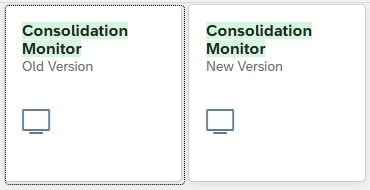
The new app gradually replaces the previous consolidation monitor and offers numerous functional improvements. While the old monitor displayed measures in a matrix, the new version uses a clear list view structured by consolidation group, process period, and measure. This makes navigation more intuitive and significantly improves the overview of multiple consolidation groups or periods.
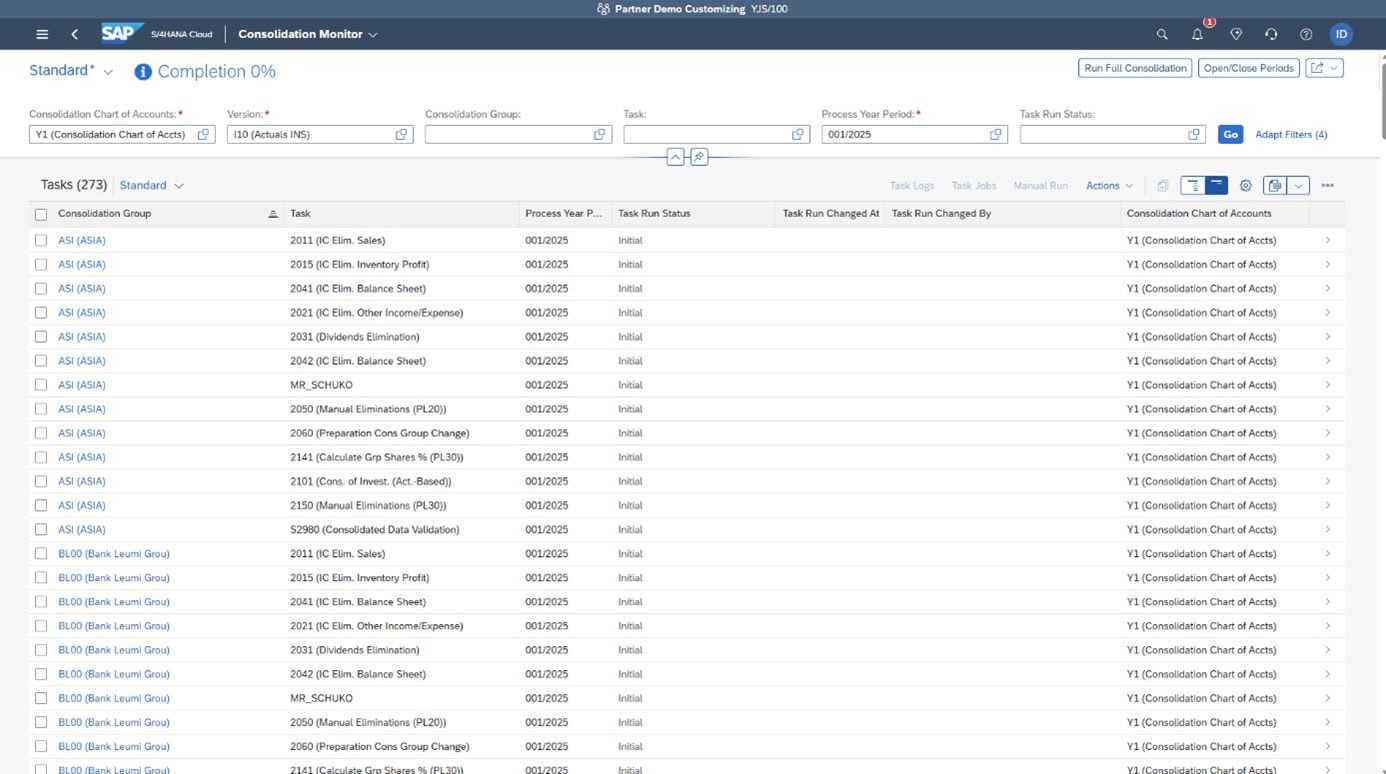
Transparency is a key feature, especially in consolidated financial statements. The new interface enables quick and targeted management of all relevant measures. Automatic, manual, and dependent actions are clearly displayed, status changes are immediately visible, and all consolidation processes can be managed centrally.
A key new concept is the introduction of process periods. This allows multiple fiscal years or periods to be bundled and processed together. This saves time and reduces the effort involved in recurring financial statements. Simultaneous processing of multiple consolidation groups in a single run is also possible, which is particularly advantageous for corporate groups with complex hierarchical structures or international subsidiaries.
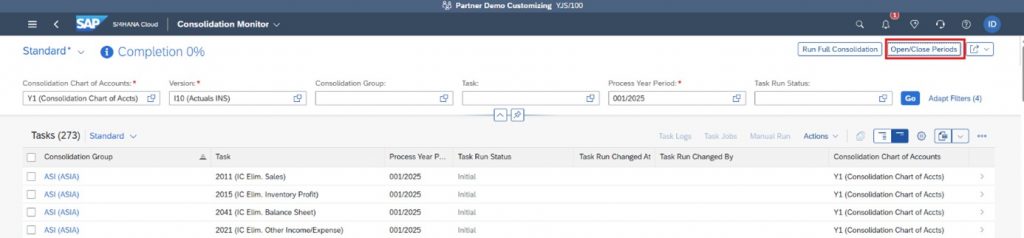
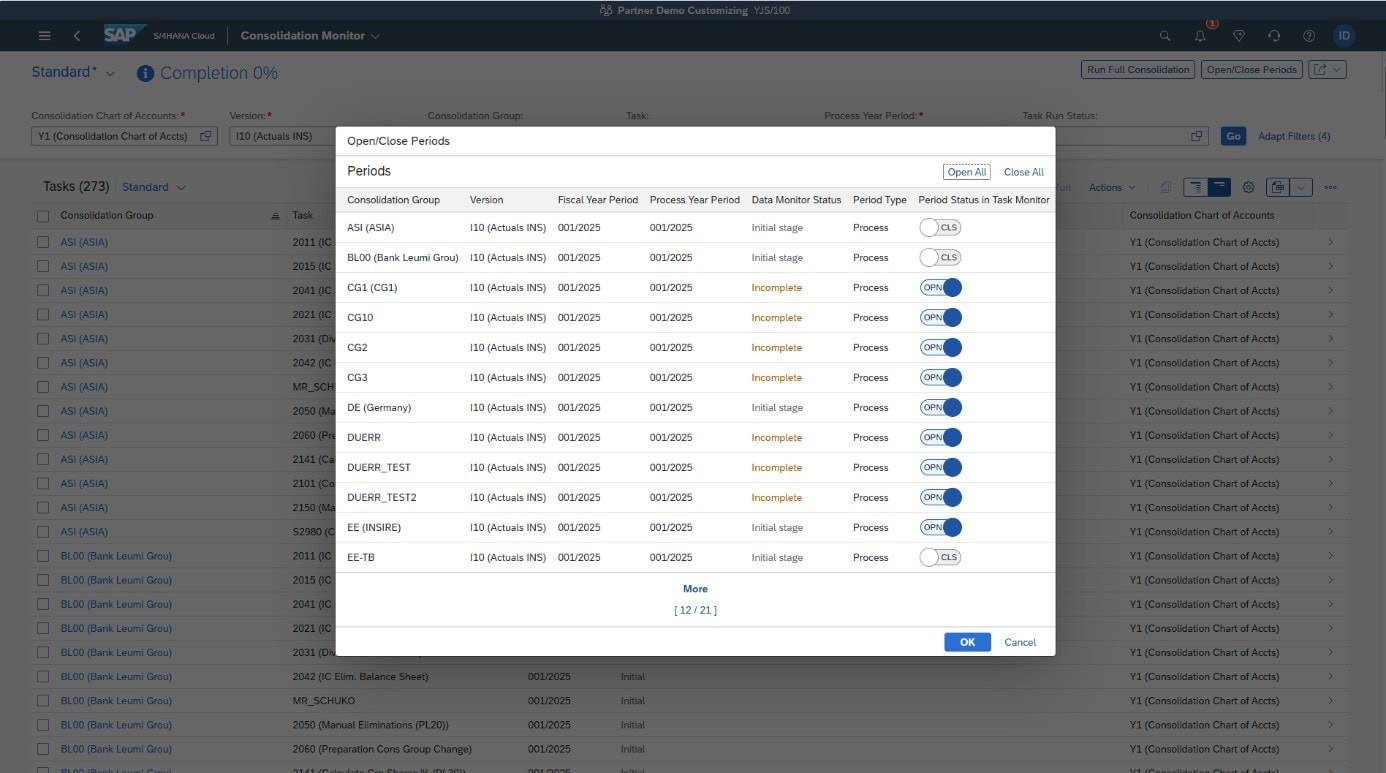
The "Open/Close Periods" function also allows multiple periods to be opened or closed simultaneously. This grouping enables extremely flexible periodic control of consolidation measures.
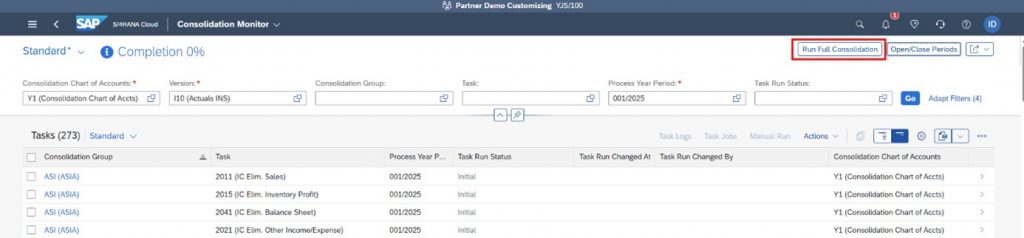
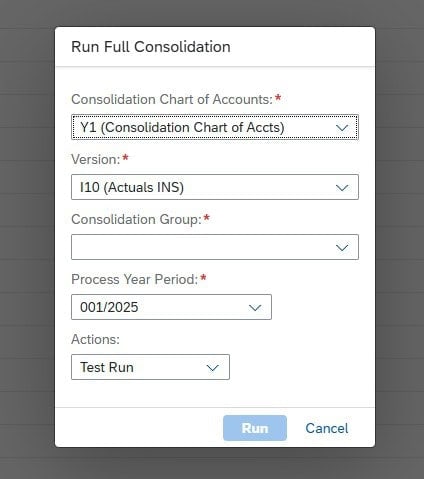
The centerpiece of the new app is the "Run Full Consolidation" function. With just one click All automated consolidation measures are initiated without requiring the user to trigger each step individually. The monitor handles job control, executes the measures sequentially, and transparently displays the progress. The key feature: Execution can also be scheduled via the central job scheduling system ("Schedule Jobs for Consolidation Tasks"), for example, overnight or at specific times.
The combination of automation and flexible control significantly reduces manual effort and ensures a consistently traceable process history – from individual financial statements to consolidated financial statements.
Also new is the ability to execute actions individually or in batches, block them, or change their status – all directly within the app. For manual booking steps, you are automatically redirected to the appropriate Fiori app. This makes the integration of the consolidation environment even smoother.
With Release 2508, SAP also introduces push notifications. Users are automatically informed as soon as a consolidation is complete or a measure fails. This significantly simplifies monitoring and minimizes waiting times for results review.
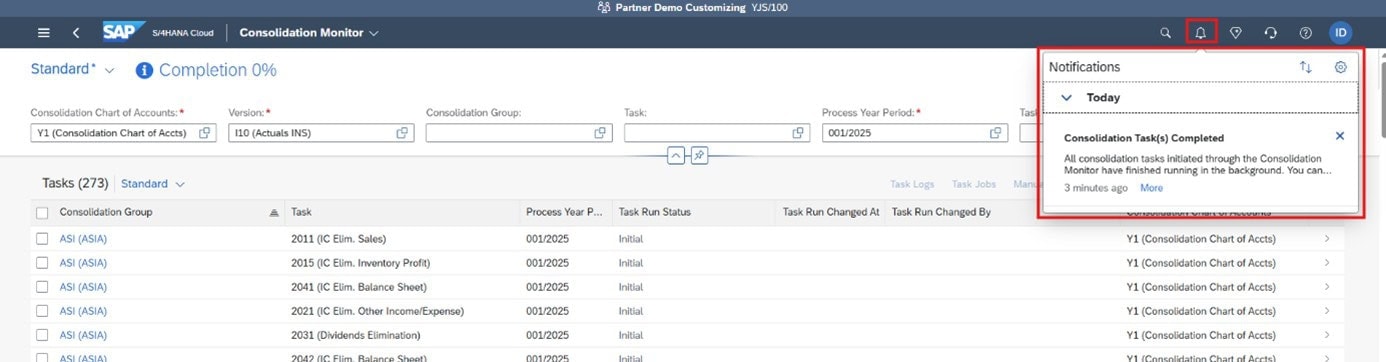
Another useful new feature is the percentage completion indicator, which displays the processing progress at any given time. Actions with the status "Blocked" or "User Intervention" are included in this metric, allowing you to see at a glance where your completion process stands.
Detailed action and job logs provide deeper insights into the process of each consolidation. They help to quickly identify sources of error, thus enabling significantly more efficient troubleshooting than before.
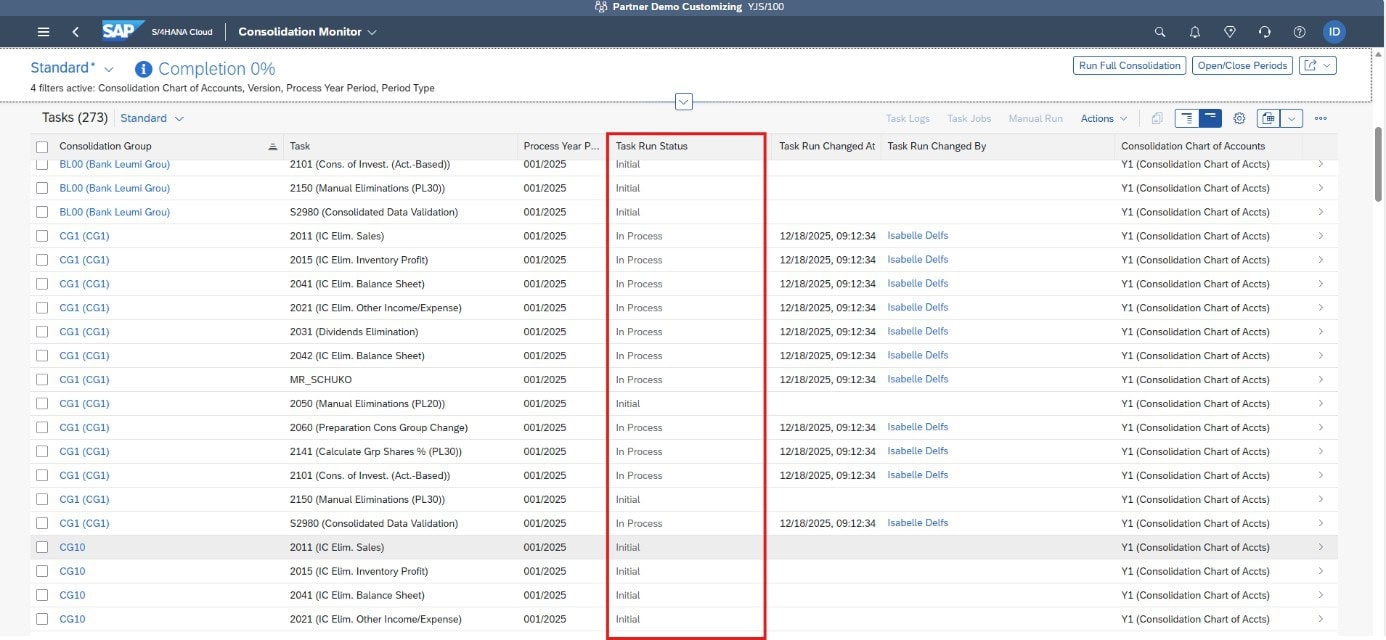
The new period logic allows for individual control of different period assignments (monthly, quarterly, or planning-based). This enables companies to adapt their consolidation cycles to their own reporting and planning processes without requiring complicated reconfiguration.
The transition between multiple periods is also seamless: With just one click, process periods can be bundled and consolidated together – ideal for organizations with parallel financial statements or reporting levels.
The new version of the Consolidation Monitor now allows for the simultaneous display and management of multiple versions. While users previously had to switch back and forth between individual versions, versions can now be filtered and monitored together with multiple periods and consolidation groups in a consistent monitor view. This creates, for the first time, true, cross-version transparency across all relevant financial statement statuses. This significantly increases efficiency, especially in complex corporate structures, because analysis, comparison, and processing are considerably faster and more structured. Users can thus benefit noticeably from more flexible management of their consolidation processes – without media breaks or context switching.
The new advantages at a glance:
And finally ...
With the new "Consolidation Monitor" app, SAP Group Reporting takes consolidation to the next level. "One-click consolidation" is no longer a vision, but a lived reality: efficient, transparent, and future-proof. Companies that want to accelerate their closing processes and simultaneously improve management should prepare to switch to the new app now.
We will gladly support you in making the best use of the new features for your consolidated financial statements.
Learn more about SAP S/4HANA Group Reporting here.
This article highlights the improvements in SAP S/4HANA 2025 that simplify financial planning and analysis processes. The focus is on enabling better reporting, increased automation, and enhanced capabilities for developers, while gradually phasing out outdated tools. These updates help finance teams and developers work more efficiently and accurately.
Optimizes the processing and reporting of organizational changes in 2025.
| Other specifications | Details |
| Managing organizational changes (F4567) | New one-step option for implementing organizational changes. |
| Import of objects (F5487) | New feature for importing spreadsheets. |
| Organizational reports (F4868, F7047) | New hierarchical and list-based reports on the impact on master data. |
| CDS views for organizational changes | New views for detailed analysis of profit centers and segments. |
(1) Improvements in accounting for banks and changes to balance sheet validation
➔ Improvements increase user-friendliness, the clarity of reporting, and control over the processes for checking account balances.
| Other specifications | Details |
| Average daily stock levels | New calculation of the average balances of the previous month via GADBKFC. |
| Multi-currency accounting | New selection of depreciation areas for MCA reclassification/revaluation. |
| Improvements in balance validation | New visualization, up to 6 grouping fields, improved handling of comments. |
(2) AI-assisted journal upload
➔ AI integration optimizes journal uploads, reduces manual effort, and improves compliance and traceability.
| Other specifications | Details |
| Overview of AI-assisted uploads | New AI-generated suggestions for booking entries with mass editing. |
| Approval workflow | New roles and integration into the workflow for upload approvals. |
| Policy & Protocol Management | New PDF upload for booking policies, AI evaluation logs, improved tracking. |
| Changes to buttons/scenarios | Buttons repositioned; old intelligent scenario discontinued. |
➔ Improves the consistency of bookings and the accuracy of depreciation.
| Other specifications | Details |
| Reverse booking logic | Delta entries have been replaced by reversal entries; migration is required. |
| Depreciation calculation | Avoidance of small differences; calculation in one segment. |
| BAdI FAA_DC_CUSTOMER | New methods for reviewing investment support and determining the transaction date. |
➔ Improves the accuracy and flexibility of asset depreciation calculations.
| Other specifications | Details |
| Depreciation calculation – automatic avoidance of small differences | Prevents minor rounding differences at the end of the year; calculation is now performed in a single time segment. |
| BAdI FAA_DC_CUSTOMER | New methods for reviewing investment support and determining the 5 transaction days for depreciation; existing Investments may require reassessment. |
➔ Optimizes and automates group reporting processes, improves validation and increases flexibility in consolidations.
| Other specifications | Details |
| Average daily stock levels | Calculates the average balances of the previous month (monthly/annually). |
| Automatic bookings | Automated group postings for consolidation units/pairs. |
| Customizing for group reports | Adds industry-specific fields, breakdowns, master data fields, and validation tasks. |
| Debit/Credit Indicator in Manual Journals | Displays balances across currencies without a sign. |
| Workflow: Initiator cannot approve | The workflow initiator cannot approve their own entries. |
| Substitution/Validation: New amount fields | Adds new fields for validation/substitution in local, group, and transaction currencies. |
| COI control panels & pre-installed rules | Automates the collection of control data for activity-based consolidation. |
| Activity-based consolidation: Changing the parent element | Automatically adjusts entries when the parent entity changes. |
| Activity-based consolidation: Dividend payout | Automates the elimination of intra-group dividends and adjustments for NCI. |
| Pre-filling global parameters in job templates | Job templates are pre-filled with global parameters (which can be changed). |
| Import of reported data | Imports Excel-based data into group reporting. |
| Create totals for missing dimension values | Takes missing dimensions into account; calculates deltas without changing the totals. |
| Improvements in document item validation | Improved validation, multiple tasks per group, restriction of the data range. |
| Group journal entries: Alternative option | Enables the reversal or modification of group journal entries via workflow. |
| Alignment function: Aggregation & product help | Aggregates data during alignment; displays processed/adjusted fields. |
| Flexible upload parameter change | Improved upload mode; fewer restrictions when using multiple versions. |
| Removing task categories from "Define task" | Cleans up old categories; replaced by specialized customizing activities. |
➔ Improves replication, error handling, reporting, and the integration of modern frameworks for faster and more reliable central finance processes.
| Other specifications | Details |
| Co-production order as target object | Enables the mapping of production/process orders to CO production orders in replication. |
| Optimized error handling with AIF & ISM | Integrates AIF with AI-powered ISM to automatically detect errors and retrieve solutions. |
| Automatic creation of SLT staging tables | Embedded SLT can now automatically create staging tables for third-party interfaces. |
| AVL Version 2 (Accounting View of Logistics) | Moves AVL into the RAP framework for better performance, error handling, and reduced manual configuration effort. |
| Readiness check tool for AVL v2 | Tool for checking system readiness for the AVL v2 transformation. |
| Statutory reporting: Country-specific | Enables country-specific statutory reporting in Central Finance (e.g., Argentina, Indonesia, Romania, Singapore). |
| Centralized payment activation with flexible options | Enables flexible activation for external vendor/customer postings and intra-group transactions. |
| Interface to Management Accounting | Online replication of CO postings (including CO-PA) to Central Finance, supports cancellations and cross-group postings. |
| Central segment reporting | Converts profitability segments from service documents into actual cost objects in Central Finance. |
➔ Optimizes internal leasing processes, offers detailed financial auditing functions and improves portfolio cost analysis.
| Other specifications | Details |
| Intercompany leasing processes | Supports lease-in and lease-out processes between companies; manages contracts, periodic bookings and valuations. |
| New usage categories | Adds four new usage types for intercompany scenarios (usable and rentable properties, with/without portfolio structure). |
| Review booklet for leasing and real estate accounting | Aggregates portfolio costs in a review booklet; compares planned and actual costs; adaptable to user needs. |
Learn more about the SAP S/4HANA transformation here.
Release 2508 introduces new functionality that enables the automated capture of control data for transaction-based capital consolidation using substitution rules. Specifically for integrated companies, this substitution rule feature offers the advantage of eliminating the need to create manual documents for adding capital consolidation activities.
The new release includes a large number of standard substitution rules. These are automatically activated and can be deactivated if needed. It is also possible to create your own custom substitution rules.
The following control fields can be taken into account in the substitution rules:
1.) Capital consolidation activity
2.) Upper unit
3.) Participation unit
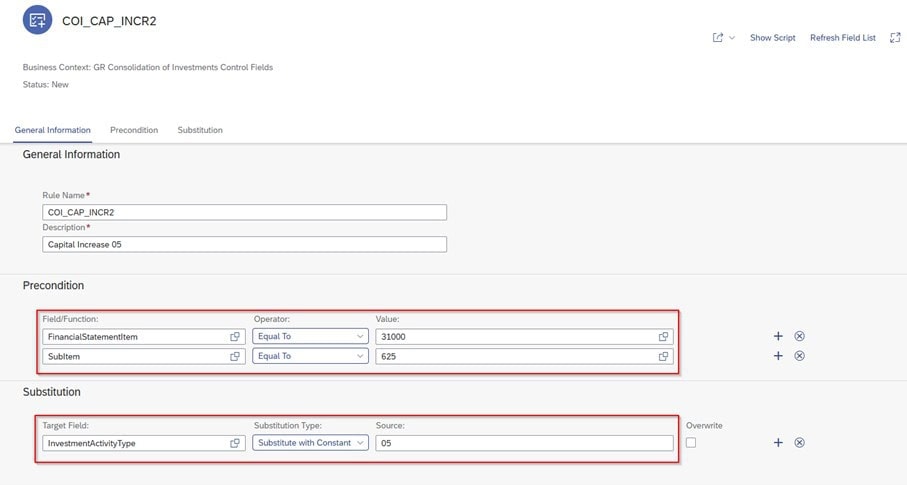
To create a new substitution rule, open the "Manage Substitution and Validation Rules" app. When creating the rule, select the relevant business context "Fields for Capital Consolidation Control in Group Reporting".
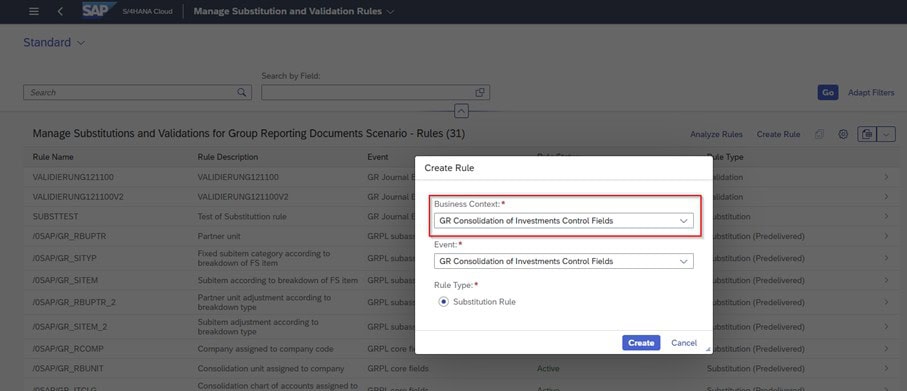
A wide variety of parameters can be selected as preconditions. These include the position, the business period, the document type, the sub-position, and many more.
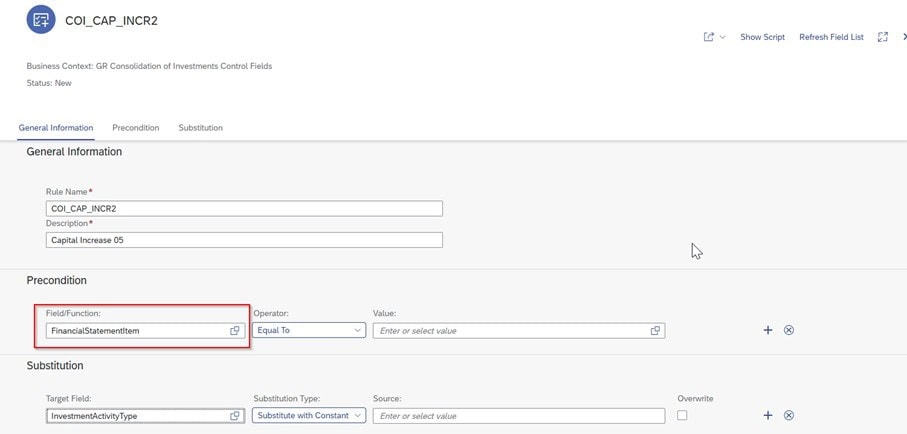
In this example, a capital position in combination with sub-position 625, used for capital increases, must be set as a prerequisite. In the substitution section, the capital consolidation activity 05 (capital increase) must be inserted.
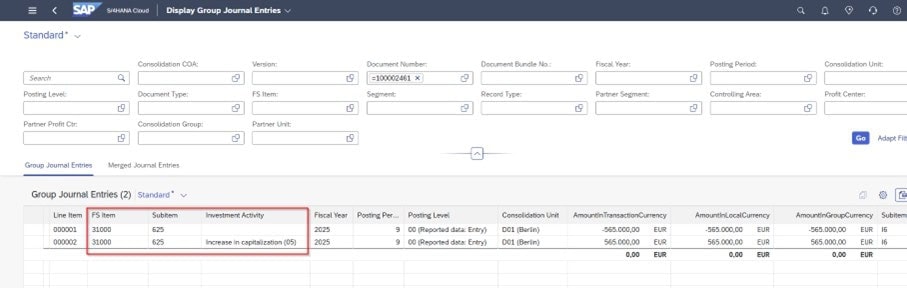
In the "View Group Accounting Documents" app, after uploading the additional reporting data, it can be seen that the capital consolidation activity 05 (capital increase) was automatically set by the substitution rule.
The solution offers several advantages:
On the other hand, the following disadvantages/challenges may arise:
And finally ...
The new ABCOI automation only offers an advantage if the accounting data is already in a consolidation-compliant structure. Incorrect classifications or missing sub-items completely prevent derivation and necessitate manual corrections in operational accounting. Therefore, the quality of the derived control data remains directly dependent on the quality, completeness, and technically correct allocation of the underlying accounting information.
Learn more about SAP S/4HANA Group Reporting here.
Our SAP Document & Reporting Compliance (DRC) Companies receive an integrated platform to meet legal requirements in the areas of invoicing, tax reporting and notifications to authorities. centralized, automated and audit-proof to implement.
SAP DRC is more than a compliance tool – it is a strategic platform that helps companies digitize and streamline their financial and reporting processes and implement legal requirements globally and in a country-specific manner.
SAP DRC's new features take efficiency, automation, and compliance to a new level – a true game changer for modern finance organizations. We support you in optimally integrating DRC into your SAP landscape and effectively designing your digital reporting processes.
Learn more about the SAP S/4HANA transformation here.
What have been happening recently in sustainability management? A concise overview of the most important regulatory developments.
The EU Council and the EU Parliament have reached a preliminary agreement on a final compromise. The consolidated legal text is available; formal votes are still pending.
A later expansion remains possible
➡️ Result: More legal certainty but a clear focus on administrative relief.
EFRAG has presented revised ESRS - a central element of the Omnibus Initiative.
→ ~70% fewer data points (from 1.073 to approximately 320)
→ Stronger focus on essentiality & feasibility
→ New questions regarding comparability & testability
→ Furthermore, EFRAG has published its "ESRS Knowledge Hub" with the aim of collecting information clearly and centrally.
➡️ ESRS readiness remains relevant, but with an adjusted scope and priorities.
The EU Parliament and the Council of Ministers have agreed on relief for companies.
Current developments make it clear: Even with adjusted reporting requirements, transparency and the ability to manage remain crucial and future-oriented. INSIRE supports your company in strategically developing and effectively aligning ESG strategies, processes, and data models.
Learn more about Sustainability ESG here.
This article focuses on improvements in financial planning and analysis in SAP S/4HANA 2025. The emphasis is on extensibility for developers, enhanced analytics, and simplified processes in overhead and product cost controlling. The goal is to enable better reporting, increased automation, and expanded opportunities for custom development, while simultaneously eliminating outdated or redundant tools.
Developers can quickly create custom applications without modifying core objects.
This changes the risk associated with upgrades.
| Other specifications | Details |
| Extensions for developer extensibility | ADT (ABAP Development Tools) supports all New objects; developers can extend via BAdIs, CDS, and BO interfaces. RAP-ready. |
| Technical details | Type: New. Component: CO-OM. Applicable to S/4HANA & Private Edition 2025. |
New analytical apps and the removal of outdated tools improve the
Transparency, accuracy of reporting and user-friendliness in the
Overhead cost controlling.
| Other specifications | Details |
| Removal of the outdated app HRY_REPELEV | Old app removed; replaced by F5295. Deleted from GL & CO reporting catalogs. Switching is mandatory for users. Permissions via Catalog assignment required. |
| New app: Cost Center Review Booklet (F7763) | New analytical app for actual/planned data, grouped predefined reports, improved cost center transparency. |
| Generic join definition across database boundaries away (SE16J) | New tool for joins across tables/CDS without programming. Supports 10 join tabs + filters. Simplifies extractions. Private Edition only. |
| Deletion of allocation apps (KB15N, KB16N, KB17N, KB21N, KB23N, KB24N) | All classic manual and activity-based allocation transactions have been deleted. Replaced by F2009 (manual) and F3697 (activity-based). |
| Hierarchy billing for service documents | Key improvement: Billing at the root node for the entire hierarchy. Reduces billing rules. EBRR+billing is now possible. Supports service contract/order/PMO hierarchies. |
| Removal of job templates in the planning of Overhead cost accounting jobs | Outdated job templates (time tracking emails and unbooked confirmations) have been removed. Usability has been improved; these will be completely removed soon. |
Simplified controlling for batch-assessed products increases accuracy and
reduces the configuration effort.
| Other specifications | Details |
| Detailed controlling level for batch-assessed Products | Batch-rated products now have batch-rated control levels enabled by default for individual orders. The parameter DETAILED_CONTROLLING_BATCHES is no longer required. It can be deactivated using NO_DETAILED_CTRL_BATCHES. |
We are happy to support you in optimally integrating the new features into your finance organization.